E-signatures let you send contracts for legally-binding electronic signatures.
How It Works
- Click "Send for E-Signature" from the gig details (1 GigPack consumed — Buy GigPacks)
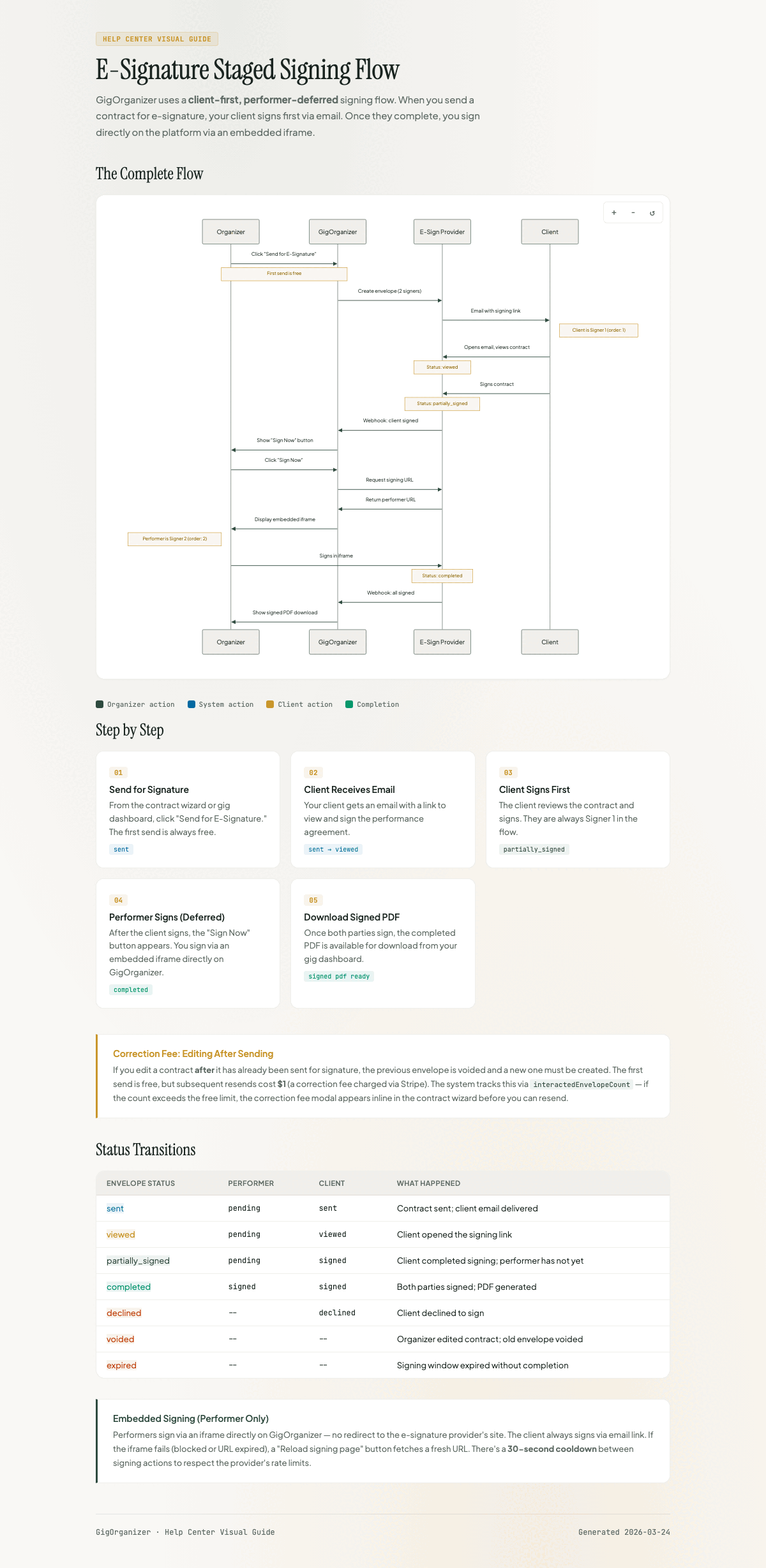
- Client receives a branded email with a signing link and signs first
- After the client signs, you receive a notification and can sign via the embedded iframe in the gig details
- Both signatures complete the contract
- Download the signed PDF anytime
Signing Order
Client signs first, then performer signs second. This protects you — clients can't claim they didn't see your terms.
Staged Signing Flow
GigOrganizer uses a staged (deferred) signing model. When you click "Send for E-Signature," only the client receives an email invitation to sign. The performer's signing step is deferred until after the client completes theirs. Once the client signs, you receive an email with a signing link and can also sign directly from the gig details via an embedded iframe. This keeps the process simple: the client signs first via email, then you sign on your own site or from the email link.
Envelope Status
| Status | Meaning |
|---|---|
| Sent | Sent to signers, awaiting signatures |
| Viewed | At least one signer has viewed |
| Partially Signed | Client has signed, performer has not yet |
| Completed | All parties have signed |
| Declined | A signer refused to sign |
| Voided | Cancelled by sender |
| Expired | Signing link expired (resend needed) |
Signer Status (Per Person)
| Status | Meaning |
|---|---|
| Pending | Not yet sent or viewed |
| Sent | Invitation delivered |
| Viewed | Signer opened the signing page |
| Signed | Signer has completed signing |
| Declined | Signer refused to sign |
Actions
- Send — Click "Send for E-Signature" to start the process
- Sign Now — Opens embedded signing for you (available after client signs)
- Refresh Status — Check for updates from the e-signature provider
- Resend — Send a new signing link if the original expired (60-second cooldown)
- Download — Get the signed PDF after completion
Common Questions
When is a GigPack consumed?
When you click "Send for E-Signature" — not when the contract is completed. Buy GigPacks from your dashboard.
What if the client doesn't receive the email?
Check spam folder and Gmail's "Promotions" tab. Verify the email address is correct. Use "Resend to Client" if needed.
Can I sign on my phone?
Yes, the signing page is mobile-friendly.
Why is the "Sign Now" button disabled?
The client must sign first. The button enables after the client completes signing.
What happens if I edit the contract after sending?
The original send and one free correction resend are included. After that, a $1 correction fee applies per resend. See Correction Fee for details.